



 By Shari Cooke
•
29 Oct 2026
•
9 min read
•
Design & Print Production
Printing a catalog comes down to five decisions: size, binding, page count, paper, and how many copies you actually need. Make those calls early, set up clean files, and proof before you print. Your catalog will arrive on time, on budget, and ready to sell.
Here’s how to handle each step, from first plan to final PDF. When you’re ready to go to press, our custom catalog printing options cover everything in this guide.

How do you plan a catalog that actually sells?
Start with one clear goal. A catalog trying to do everything usually does nothing well. Common goals include:
- Driving direct orders from a mailing list
- Supporting a seasonal campaign or promotion
- Launching a new product line
- Equipping sales reps with a current reference for customer meetings
Tie that goal to a metric you can track, like response rate, QR code scans, or average order value.
Next, define your reader. B2B audiences care about specs, pricing tiers, and buying authority, so segment by industry and role. Consumer audiences respond to lifestyle imagery and seasonal timing. Your audience shapes everything from photo style to how much technical detail you include.
Then map your content before anyone opens a design file:
- Group products by category or use case.
- Put hero products and new arrivals in premium spots: the cover, inside covers, and first spread.
- Plan cross-sells and bundles next to related items.
- Standardize your calls to action (QR codes, short URLs, or phone numbers) so readers always know how to buy.
- Add helpful extras like size charts or buyer’s guides. They build trust and cut down on returns.
What size should your catalog be?
Size affects cost, postage, and how your products look on the page. You can choose from:
- 8.5″ x 11″: Maximum room for imagery and product detail.
- 5.5″ x 8.5″: Compact and budget-friendly, with lower paper and postage costs.
- A4: The international standard, ideal for catalogs headed to readers outside North America.
- Custom sizes: For when your brand or product calls for something different.
If you’re mailing, check the USPS size standards for flats before you finalize the layout. Dimensions and thickness determine your mail category, and a small change can shift your postage rate.
Which binding is best for a catalog?
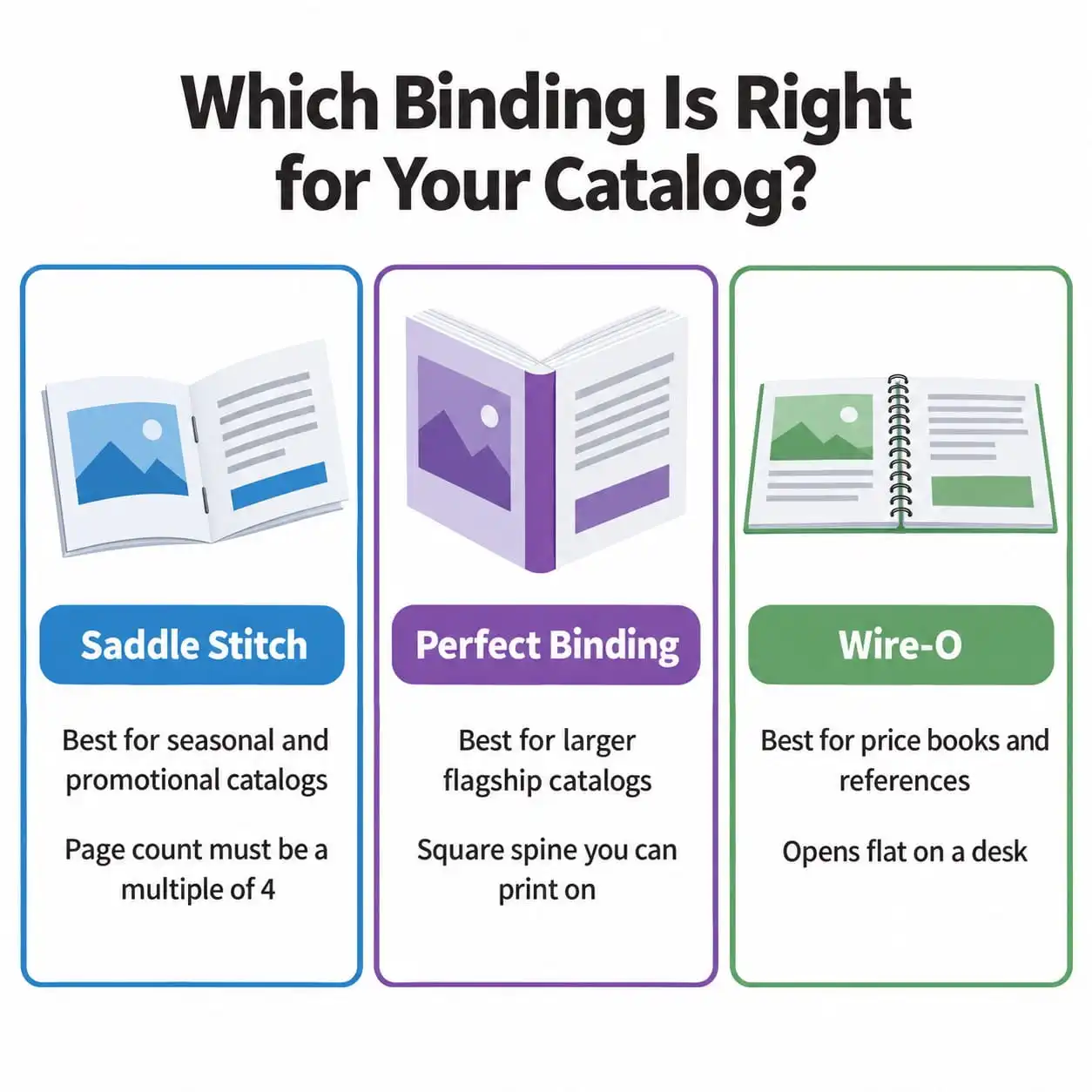
Your binding depends on page count and how readers will use the catalog. Here’s how your three options compare.
Saddle stitch binds folded sheets with wire staples along the spine. It’s affordable, quick to produce, and ideal for seasonal or promotional catalogs with lower page counts. Learn more about how saddle-stitched booklets work. You can build one in our Booklet Builder.
Perfect binding glues pages into a square spine, like a paperback. It handles higher page counts, looks premium, and lets you print a title on the spine. We offer perfect binding through special instructions on your order.
Wire-O binding threads a double loop of wire through punched holes along the spine. Catalogs open flat and fold back on themselves, which makes Wire-O a smart pick for price books, product references, and spec guides that sales reps or customers keep open on a desk. Images that cross the gutter won’t line up perfectly, so save full-spread photography for saddle stitch or perfect binding.
Quick pick:
- Reference catalog that gets used daily: Wire-O
- Seasonal or promotional catalog with a lower page count: saddle stitch
- Larger flagship catalog or lookbook: perfect binding
How many pages can a catalog have?
Page count drives your binding choice, your cost, and your postage. A few rules to plan around:
- Saddle stitch counts must be a multiple of four. Each folded sheet creates four pages. If you come up short, add an order form, a notes page, or a brand story rather than leaving blanks. Saddle stitch works best for lower page counts.
- Perfect binding suits higher page counts. It needs enough pages to form a square spine. Spine width depends on page count and paper, so lock both in before your designer finalizes the cover.
- Wire-O adapts as your catalog grows. That flexibility makes it a smart choice when page counts shift between editions.
- Count every page, covers included. A self-cover (same paper throughout) counts differently than a separate card stock cover.
Every page adds cost. If a section isn’t earning its space, cut it and put the budget toward better paper or a bigger mailing.
What paper is best for catalog printing?
Match your paper to your content and your budget.
Interior pages:
- Economy and Value: Cost-effective choices for high page counts, internal price books, and catalogs you update often.
- Premium White and Premium Paper White: A brighter, more substantial feel for customer-facing catalogs.
- Glossy White: Makes photos sharp and colors vivid. The go-to for product-heavy catalogs.
- 100% Recycled: A strong fit for brands with sustainability commitments.
- Colored Paper: Useful for section dividers, order forms, or inserts that need to stand out.
Covers:
- White Card Stock: Sturdy and versatile.
- Glossy White: Adds polish and makes cover photography pop.
- White 100% Recycled: Pairs with recycled interiors for a consistent sustainability story.
A card stock cover helps your catalog hold up in the mail and on a desk. Not sure which combination feels right? Order a single printed copy and see for yourself before committing to a full run.
Should you print in full color or black and white?
Full color is the default for most customer-facing catalogs, since product photography sells. Black and white keeps costs down for text-heavy price lists, spec sheets, and internal references. You can print in either.
How do you set up print-ready catalog files?
Clean files prevent delays and reprints. Before you export, check these:
- Trim size matches your final catalog dimensions.
- Bleed extends 0.125″ past the trim on all sides.
- Safety margin keeps text and key content at least 0.25″ inside the trim.
- Color mode is CMYK (cyan, magenta, yellow, black: the four ink colors used in print), not RGB.
- Images are 300 dpi (dots per inch) at final size.
- Logos and line art are vector files wherever possible.
- Fonts are embedded or outlined.
- Small black text uses 100% black only. Save rich black for large headlines and solid areas.
- The gutter stays clear of critical text, especially on spreads.
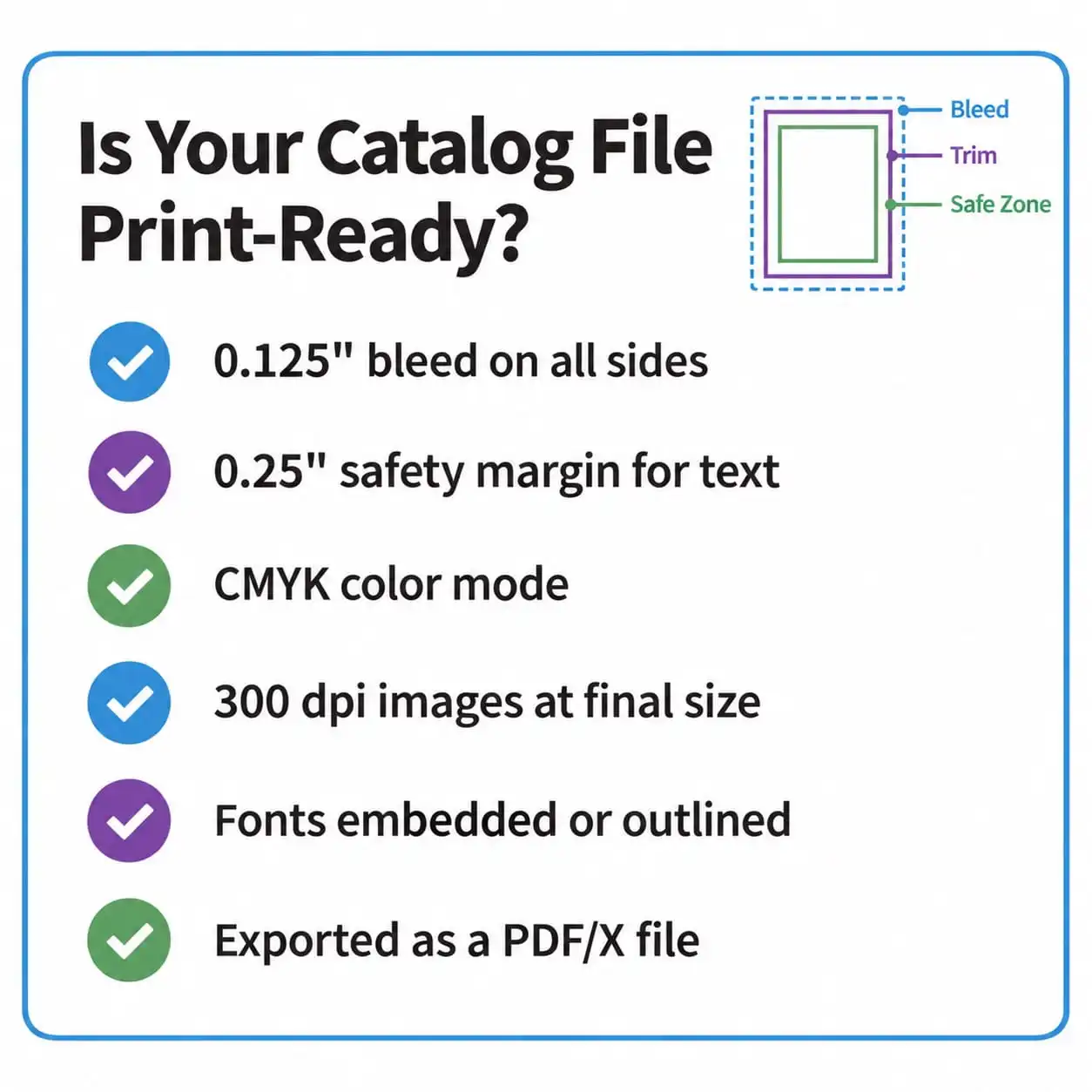
Be sure to create a print-ready PDF. In Adobe InDesign, PDF/X-1a or PDF/X-4 (print-standard PDF formats) are reliable choices, and Adobe’s guide to InDesign PDF export options walks through each setting. Run a preflight check to catch missing links, overset text, and stray RGB images. Export single pages rather than spreads unless your printer asks otherwise.
How should you proof a catalog before it prints?
Proof twice: once on screen, once on paper.
Use an on-screen PDF to check typos, pricing, and page order. Then print a single copy to review color, paper feel, and binding. With on-demand printing, a one-copy proof is fast and practical.
On your printed proof, check that:
- Brand colors and skin tones look right.
- Bleeds and trims are clean.
- Images line up across the gutter.
- QR codes and UPCs scan.
- Prices and SKUs match your current system.
Have someone outside the project read it, too. Fresh eyes catch what yours skip over.
How many catalogs should you print?
This is where on-demand printing changes the math. Traditional print runs push you toward big quantities to lower the unit price. Then pricing changes, products get discontinued, and boxes of outdated catalogs sit in a storage closet.
With on-demand printing, you print only what you need, when you need it. That lets you:
- Test before you scale. Mail a small batch to one segment, measure the response, then expand.
- Update between runs. Change a price or swap a product in your file, and your next order reflects it.
- Version by audience. Create separate editions for regions or segments, each with its own offer code.
- Hit tight deadlines. Order by 10pm and have catalogs delivered as early as 8am the next day.
- Reach readers worldwide. Our global print hubs print close to your destination, so international catalogs arrive faster.
How do you distribute catalogs and measure results?
Get your catalog in the right hands, then track what it does.
- Direct mail: Our end-to-end direct mail service includes tracking, so you know when catalogs land and can time your follow-up.
- Sales teams and partners: Set up a branded Mimeo Marketplace storefront so reps can order the current, approved catalog themselves. No more outdated versions in the field.
- Digital editions: Share a secure digital version through Mimeo Digital’s content distribution platform and see how readers engage.
To measure results, give each version its own offer code, QR code, or PURL (personalized URL). Track response rate, conversion rate, and average order value. Use what you learn to refine your product mix, cover, and calls to action for the next edition.
Frequently Asked Questions
How much does catalog printing cost?
Cost depends on size, page count, paper, binding, and quantity. On-demand printing keeps total spend in check because you only pay for the copies you use.
What’s the difference between a catalog and a booklet?
A catalog is a booklet built to showcase products and pricing. They use the same bindings and production process.
Can I print a small quantity of catalogs?
Yes. On-demand printing lets you order as few as one copy, which is ideal for proofs, tests, and short runs.
How long does catalog printing take?
Order by 10pm and your catalogs can arrive as early as 8am the next day. Build in time for proofing before you place your final order.
What file format do I need for catalog printing?
A high-resolution PDF with bleeds, embedded fonts, and CMYK color. PDF/X-1a or PDF/X-4 works well.
Bring your catalog to life
You’ve planned it, designed it, and proofed it. Now start your catalog printing project and have copies in hand as soon as tomorrow morning.
Things to remember
- Choose your binding based on page count and how readers will use the catalog.
- Saddle stitch page counts must be a multiple of four.
- Use coated paper for photos and uncoated paper for text and order forms.
- Set up files with 0.125″ bleed, 0.25″ safety margins, CMYK color, and 300 dpi images.
- Proof on screen and on paper before your full run.
- Print on demand to test, update, and version your catalog without waste.
What you should read next

Shari Cooke
Director of Customer Service
Shari Cooke is Director of Customer Service for Mimeo Business US, with more than 12 years at Mimeo and a background in graphic design that gives her a unique eye for both the creative and operational sides of print. Based in Memphis, she leads the team that keeps customer orders running smoothly from file to delivery. Her posts help businesses avoid common print pitfalls and get professional results, drawing on years of solving real customer challenges firsthand.

 Mimeo Print
 Mimeo Digital for Participants
 Mimeo Marketplace
 PrintX
 Mimeo Photos