




 By Paul Arnold
•
26 Nov 2018
•
Updated 22 Jul 2026
•
5 min read
•
Industry Applications
By Paul Arnold
•
26 Nov 2018
•
Updated 22 Jul 2026
•
5 min read
•
Industry Applications
Diners have more digital touchpoints than ever, ordering kiosks, tableside tablets, loyalty apps, and QR code menus. But every one of those tools only pays off if staff know how to run it. This is where restaurant and hospitality training solutions matter as much as the technology itself.
Here are four types of restaurant technology reshaping the guest experience, and what each one means for training your team.
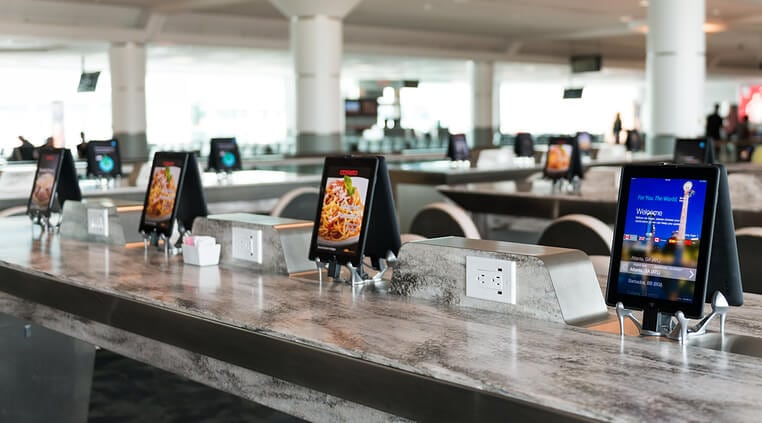
1. Self-service ordering and payment devices
Self-service kiosks and tabletop tablets let guests order, pay, tip, and split a check without waiting on a server. The appeal is speed: self-service kiosks can cut order times by as much as 40% compared to a traditional line, and they tend to reduce order errors along the way.
Kiosks and tablets also open the door to built-in upselling. Instead of a server asking if a guest wants fries with that, the screen can surface a suggested add-on with a photo, right when the guest is deciding. That’s a version of suggestive selling built into the interface itself, and staff still need to know how it works so they can troubleshoot it when a guest has a question.
2. Waitlist and virtual queue software
Waitlist software has mostly replaced the host stand clipboard. Guests join a virtual queue, get a text when their table is ready, and can wander off instead of hovering by the door. For front of house staff, this shifts the job from managing a physical line to managing a screen, which means training now has to cover the software itself, not just how to greet a party of four.

3. QR codes and contactless menus
QR code menus have become the default way many restaurants deliver a menu, since they’re low-cost, need no app download, and plug into ordering and payment flows guests already use. Some restaurants have taken this further, using QR codes to collect feedback on the spot or drive loyalty sign-ups without a server involved at all. Staff still need to know the menu cold, since a QR code doesn’t answer a guest’s questions about an allergen or a substitution.
4. Loyalty and rewards apps
Loyalty programs are paying off in a measurable way. Loyalty members now outspend anonymous guests at checkout, and loyalty transactions grew close to 29% year over year as more guests moved to digital ordering channels. It’s no surprise that most limited-service and full-service operators are now investing in loyalty and rewards technology.
None of that growth runs on autopilot. Staff need to know how to enroll a guest on the spot, troubleshoot a points issue, and explain what a promotion actually includes.
What this means for training
More technology on the floor doesn’t reduce the need for training. It changes what training has to cover. A few things worth building into any rollout:
- Research before you buy. Decide whether the goal is speeding up front of house, back of house, or both, since restaurant technology is usually built for one or the other.
- Pilot at one location first. Track what works and what breaks before rolling out chainwide.
- Build a backup plan. Document issues as they come up so the next location’s rollout goes faster.
- Train both sides of the house. Front of house staff need to run the tool with guests watching. Back of house staff need to know how it changes ticket flow and timing.
- Scale what worked. Apply lessons from the pilot location, but expect some adjustment at every new site. Every restaurant runs a little differently, and staff at each one need training that accounts for that.
Well-trained staff also tend to stick around longer, and giving them the confidence to handle new tools smoothly is one of the more overlooked ways to empower employees.
Frequently Asked Questions
Does new restaurant technology reduce the need for staff training?
No. It shifts what training covers. Staff still need product knowledge and hospitality skills, plus the ability to run and troubleshoot whatever tool is in front of them.
Should front of house and back of house staff be trained on new technology differently?
Yes. Front of house staff need to operate the tool with a guest present, while back of house staff need to understand how it affects order timing and kitchen flow. Training built for one won’t fully cover the other.
What’s the biggest mistake restaurants make when rolling out new technology?
Skipping the pilot phase. Testing at one location first surfaces issues before they multiply across every site, and gives staff time to get comfortable before a full rollout.
Things to remember
- Kiosks and tabletop ordering speed up service and reduce errors, but only when staff know how to support them.
- QR codes and contactless menus don’t replace staff knowledge of the menu itself.
- Loyalty programs are driving real revenue growth, and staff need to know how to manage them at the register.
- Pilot new technology at one location, document what happens, and adjust training before scaling.
Rolling out new restaurant technology is only half the job. Build the training program that gets your whole team ready to use it well.

Paul Arnold
VP of Customer Success
Paul Arnold is VP of Customer Success at Mimeo, where he's spent over 13 years working directly with customers: first in account management and enterprise sales, and now leading the teams that support them. Having managed relationships with Fortune-level companies through every stage of the print buying cycle, he knows firsthand where document programs succeed and where they break down. His posts help businesses get more value from their print operations, from onboarding through long-term growth.

 Mimeo Print
 Mimeo Digital for Participants
 Mimeo Marketplace
 PrintX
 Mimeo Photos