




 By Mia Conway
•
3 Nov 2026
•
8 min read
•
Direct Mail & Print Marketing
Returned mail services help you find out why mail came back, fix the bad records, and keep the same mistakes from happening again. The main options are USPS’s Address Change Service, return mail processing providers, list hygiene providers, and full-service direct mail partners that handle addressing before anything prints. Most teams use a mix, but the cheapest returned mail is the piece that never comes back.
Every return costs you printing, postage, and the time someone spends figuring out what went wrong. Below, we’ll walk through each type of service, what those yellow USPS labels mean, and how to choose the right help for your direct mail program.
What services handle returned mail?
Four types of services handle returned mail, and each one solves a different part of the problem.
| Service type | What it does | Best for |
|---|---|---|
| USPS Address Change Service (ACS) | Sends you electronic notices with a new address or the reason a piece couldn’t be delivered, so you aren’t sorting paper returns by hand | Regular mailers who want returns as data, not envelopes |
| Return mail processing providers | Receive your returned pieces, scan them, log the reason, and send you the data to update your records | Organizations with steady statement or notice mail, like banks, insurers, and utilities |
| List hygiene providers | Check your list against USPS data before you mail, including CASS and NCOA checks | Anyone mailing to a list that’s more than a few months old |
| Full-service direct mail partners | Print, address, and mail your pieces, and handle USPS mailing requirements along the way | Teams that print more than mail and want fewer vendors to manage |
Two acronyms come up constantly here:
- CASS (Coding Accuracy Support System) is the USPS standard for checking and correcting addresses so they match official postal records.
- NCOA (National Change of Address) updates your list for people and businesses that filed a change of address with USPS.
The first two services react after mail comes back. The last two help stop it from coming back at all, and that’s where you save the most. USPS also publishes details on how Address Change Service works if you want to go deeper.
Why does mail get returned?
Most returned mail traces back to bad address data, not the Postal Service. The usual culprits are simple:
- Typos in street names, numbers, or ZIP Codes
- Missing apartment, suite, or unit numbers
- Outdated records from people and businesses that moved
- Names that don’t match anyone at the address
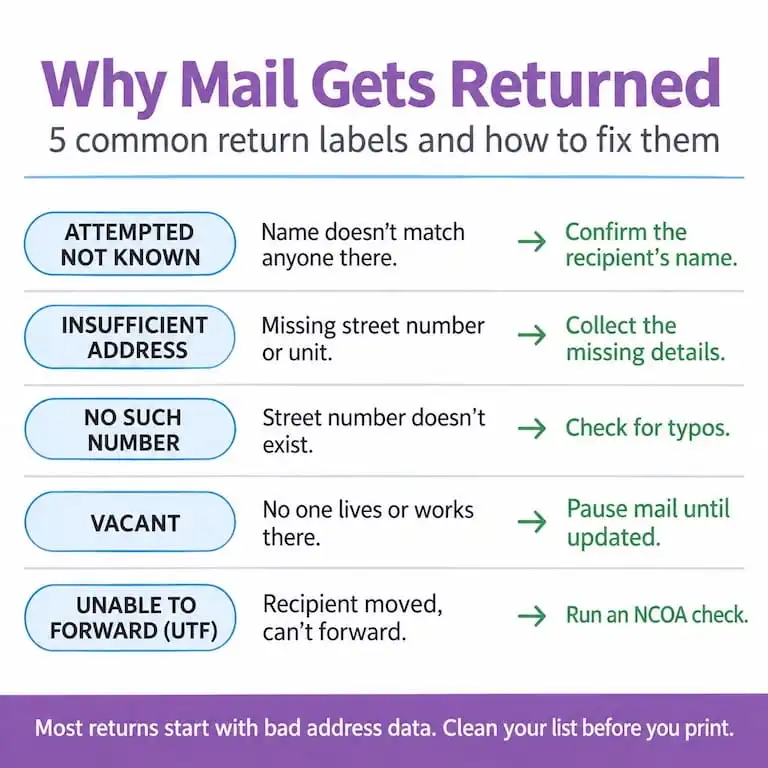
When a piece can’t be delivered, USPS marks the reason on a yellow label or in the barcode. Here are the USPS return to sender reasons you’ll see most and what to do about each one.
| Label | What it means | What to do |
|---|---|---|
| Attempted Not Known | The carrier tried, but no one at the address knows the recipient | Confirm the name with your customer or source system |
| Insufficient Address | A key detail is missing, like a street number or unit | Collect the missing details and reformat to USPS standards |
| No Such Number | The street number doesn’t exist | Check for typos and verify against USPS data |
| Vacant | No one lives or works at the address | Suppress the record until you have a new address |
| Unable to Forward (UTF) | The recipient moved, but USPS can’t forward the piece | Run an NCOA check and look for a new address |
One thing many mailers miss: you won’t always see your bad addresses. Undeliverable marketing mail is often discarded instead of returned unless the piece carries an endorsement like “Return Service Requested” or “Address Service Requested.” If nothing comes back, that doesn’t mean everything arrived.
What does UTF mean on returned mail?
UTF stands for Unable to Forward. It means the recipient moved, but USPS couldn’t send the piece on to a new address. That usually happens for one of two reasons: the person never filed a change of address, or their forwarding order has expired.
A UTF label tells you the address on file is no longer good. Here’s how to handle it:
- Flag the record so it doesn’t go out in your next mailing.
- Run an NCOA check to see if a newer address is on file with USPS.
- Reach out another way by email, phone, or text if NCOA comes up empty.
- Update your source system, not just the mailing list, so the fix sticks.
If you see lots of UTF returns at once, that’s a sign your list hasn’t been checked against change-of-address data in a while.
How do you stop mail from coming back?
You stop returned mail by catching bad addresses at three points: when you collect them, when you store them, and right before you print.
- At intake, use structured fields. Give apartment, suite, and unit numbers their own field instead of a free-form address box. Turn on address autocomplete in web forms so typos never make it in.
- In your database, clean on a schedule. Run CASS and NCOA checks regularly, remove duplicates, and keep one source of truth so a fix in your CRM reaches billing and mailing too.
- Before every mailing, verify again. People move constantly, so a list that was clean last quarter may not be clean today. A final check right before print is the cheapest insurance you can buy.
This is also where on-demand printing helps. When you print only what you need for each send, you can work from your freshest list instead of a print run you ordered months ago.
What should you do when mail is returned?
Treat every returned piece as a data fix, not just a piece of paper to toss. A simple routine keeps the same address from failing twice:
- Sort by reason. A UTF needs an NCOA check, while an Insufficient Address needs missing details. Grouping returns by label tells you which fix to apply.
- Update the source record. Fix the address in your CRM or member database, not only in this campaign’s list.
- Suppress until it’s fixed. Hold the record out of future mailings so you don’t pay to mail it again.
- Follow up on other channels. Email or text the recipient to confirm their current address.
Then track your return rate by campaign and region. Review it monthly, and spot-check a sample of records each quarter. If one form, team, or list source keeps producing returns, you’ve found the place to fix.
How do you choose a returned mail service?
Start with where your returns come from. If you send high volumes of statements or notices, a return mail processor or ACS can save your team hours of manual work. If you mail marketing pieces, newsletters, or donor appeals a few times a year, prevention gives you more for your money.
Whichever way you lean, ask every vendor these questions before you sign:
- Do you run CASS and NCOA checks on every list, or only on request?
- What happens to my returned or undeliverable pieces? Are they sent back, reported, or discarded?
- Will I get a report of bad addresses I can use to update my records?
- Which USPS endorsements do you print, and why?
- How fresh does my list need to be when I upload it?
If direct mail is one of several things you print, a full-service partner can keep it all in one place. With our direct mail services, you upload your list, personalize pieces with variable data printing, and we handle printing, USPS mailing requirements, and delivery tracking. Because we print on demand, you can mail from your freshest list every time instead of a batch you printed months ago.
Still comparing options? Our breakdown of how to choose a direct mail vendor covers automation, CRM integration, tracking, address quality, and pricing side by side.
Frequently Asked Questions
What does “addressee unknown” mean on mail?
It means no one at the address recognizes the recipient’s name. USPS usually marks these pieces “Attempted Not Known.” Check the spelling against your source system, then confirm the address with the recipient.
What does NCOA mean?
NCOA stands for National Change of Address. It’s the USPS database of change-of-address requests, and running your list against it replaces old addresses with current ones before you mail.
Does NCOA catch every move?
No. NCOA only knows about moves that people or businesses reported to USPS. That’s why it works best alongside other checks, like confirming addresses by email or at each customer touchpoint.
How often should you clean a mailing list?
Check it before every mailing, and run a deeper cleanup at least quarterly if you mail often. The longer a list sits, the more of it goes stale.
Ready to send mail that actually arrives?
Fewer returns start with fresher lists and a partner that handles the postal details for you. We print only what you need, mail it on your schedule, and give you your time back. Talk to us about simplifying your next direct mail campaign.
Things to remember about returned mail
- Returned mail services include USPS ACS, return mail processors, list hygiene providers, and full-service direct mail partners.
- Prevention saves more than processing. Clean your list before you print, not after mail comes back.
- UTF means Unable to Forward: the recipient moved and USPS can’t send the piece on.
- Run CASS and NCOA checks before every mailing.
- Undeliverable marketing mail is often discarded, so no returns doesn’t mean no problems.
- Fix addresses in your source system and suppress bad records until they’re corrected.
- Ask every vendor what happens to your returned pieces before you sign.
What you should read next

Mia Conway
Director of Customer Success
Mia Conway is Director of Customer Success at Mimeo, with nearly a decade of experience supporting the company's customers and a background in account management and production spanning brands like Calvin Klein. She specializes in understanding what customers actually need (not just what they ask for) and turning that insight into smoother, more reliable print programs. Her posts help businesses navigate the practical side of ordering, managing, and distributing printed materials.

 Mimeo Print
 Mimeo Digital for Participants
 Mimeo Marketplace
 PrintX
 Mimeo Photos