




 By Paul Arnold
•
25 Mar 2026
•
Updated 21 Jul 2026
•
8 min read
•
Design & Print Production
By Paul Arnold
•
25 Mar 2026
•
Updated 21 Jul 2026
•
8 min read
•
Design & Print Production
Print version control is the practice of tracking, managing, and releasing the correct iterations of printed materials throughout their lifecycle. If your organization produces sales collateral, regulated documents, packaging, or training manuals, a dependable version control process stops outdated content from going to press, reduces waste, and protects brand and compliance standards. You can host all of your documents in a digital marketplace for ease of use.
This guide explains how print version control works, how to implement it, the benefits you can expect, and the common pitfalls to avoid. Along the way, we’ll connect print version control to broader document version control and version control for files so you can align your print and digital workflows.
Understanding Print Version Control
Print version control is a structured approach to identifying, tracking, approving, and distributing distinct iterations of documents intended for print. Each file or template receives a unique version identifier, along with approval records and change history, ensuring that only the most accurate, authorized version is printed and distributed. In practice, it sits alongside document version control used for digital assets and the broader category of version control for files across your business.
The stakes are high. Without clear versioning, teams risk printing outdated or inconsistent materials, leading to brand errors, regulatory exposure, and costly reprints. Strong controls streamline reviews, improve collaboration with stakeholders and vendors, and create a defensible audit trail for compliance and quality assurance. Thinking holistically about document version control helps you keep digital and print messages aligned, and applying version control for files across repositories prevents drift between channels.
Core components of a print version control system include:
- Unique version IDs (for example, v1.2 or semantic versioning like 2.1.0)
- Status labels (draft, in review, approved, archived)
- Change logs describing what changed and why
- Access controls to restrict updates and approvals to authorized users
- Metadata fields such as owner, department, product line, and effective date
- Retention and disposition policies for archiving, including handling policies for different types of retractions
Together, these elements create a repeatable structure that removes ambiguity and produces consistent output.
How Print Version Control Works
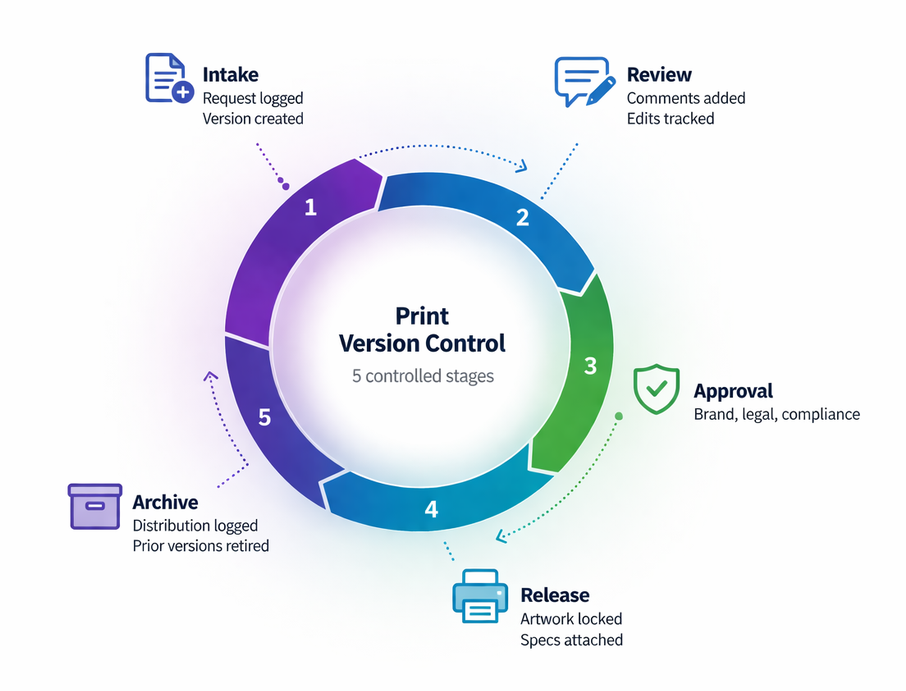
A typical workflow moves through a series of controlled stages:
- Intake and creation: A request is logged and a draft file is created with a new version ID.
- Review and annotation: Stakeholders comment and suggest edits in a controlled environment.
- Approval gates: Brand, legal, and compliance checks are completed before a status changes to approved for print.
- Release to print: The approved artwork is locked, color profiles are embedded, and print specifications are attached.
- Distribution and archive: Shipped quantities, dates, and recipients are linked to the version record, while prior versions are archived or retired.
Metadata is central to tracking and traceability. Critical fields include document owner, business unit, intended use, print specifications (size, stock, finish), color profiles, effective and expiration dates, related SKUs, and timestamped approval records. Rich metadata powers quick search, prevents accidental reuse of obsolete files, supports reporting, and enables automated rules such as blocking prints after an expiration date.
Manual version control relies on file naming conventions, shared drives, and email approvals. While simple to start, it is prone to mislabeling, duplicate files, and weak audit trails. Automated version control leverages digital asset management (DAM) or product information management (PIM) systems, structured approval workflows, and print-on-demand platforms. Automation reduces human error, enforces required fields and gates, and creates a comprehensive history of who changed what and when, which is critical for scaling teams and meeting regulatory requirements. Importantly, applying document version control and version control for files consistently across systems reduces the risk of mismatched print outputs.
Implementing Print Version Control
Begin with governance. Define roles and responsibilities such as document owner, reviewer, approver, and print coordinator. Establish a clear, consistent versioning scheme across teams. Next, design metadata standards with mandatory fields and controlled vocabularies. Configure your repository, whether a DAM, cloud storage with permissions, or a print management platform, and map folder structures or collections to your taxonomy. Build approval workflows with defined gates and service-level expectations, then pilot with a representative set of documents before a broader rollout. Train teams on naming conventions, metadata, and approval etiquette, and document the process in a playbook that aligns print version control with broader document version control.
Adopt best practices to maintain control and visibility:
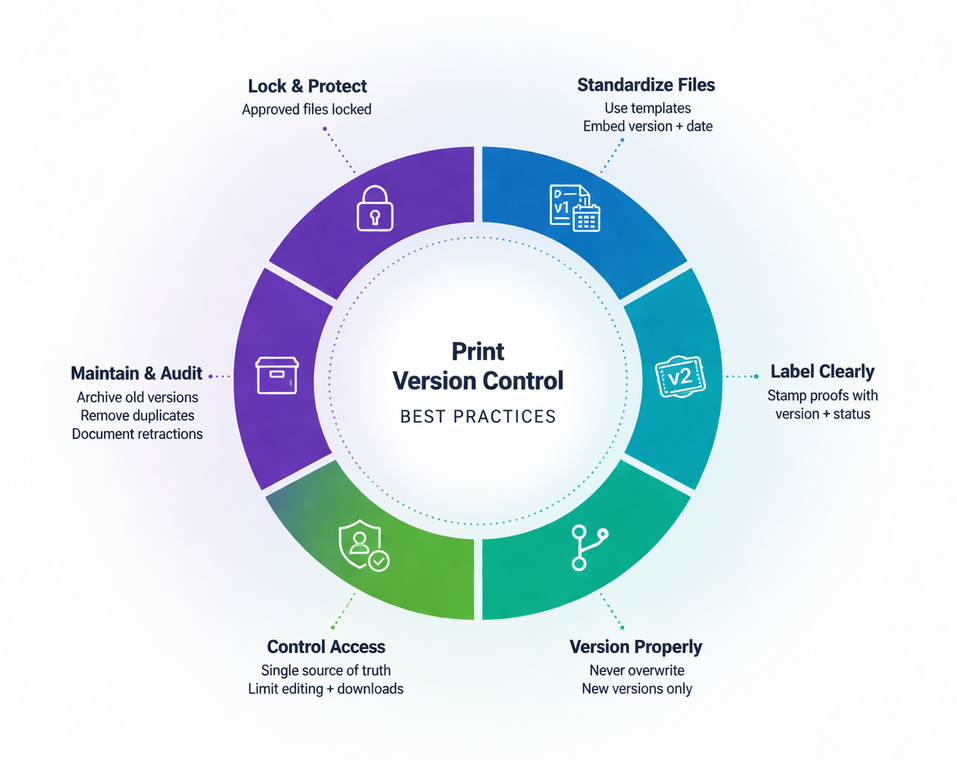
- Lock approved files to prevent edits and ensure press-ready fidelity.
- Use templates with embedded version and date fields on the artboard.
- Stamp proofs with version and status for quick identification.
- Avoid overwriting; save a new version rather than replacing files.
- Maintain a single source of truth and restrict download of working files to editors.
- Provide read-only access for most users to prevent unauthorized changes.
- Align print specs with your vendor and store ICC profiles and dielines alongside assets.
- Document how to handle different types of retractions, such as immediate pullbacks for regulatory updates versus phased withdrawals for brand refreshes.
- Regularly audit repositories to archive stale content and remove redundant or obsolete versions.
Choose tools that fit your scale and industry requirements. DAM systems offer versioning, metadata, and permissions. Project management and proofing tools enable collaborative reviews and e-signature approvals. Cloud storage with robust version history can work for smaller teams when supported by strict conventions. For production, print-on-demand and web-to-print solutions ensure users order only approved versions and automatically pull the latest files. Integrations between your DAM and print provider synchronize approved assets and reduce manual handoffs. This ecosystem unites print version control with version control for files used in digital channels.
Benefits of Print Version Control
Strong version control delivers measurable operational and financial gains:
- Fewer errors and lower costs by keeping outdated materials off press and avoiding expensive reprints.
- Prepress efficiency due to accurate specs and locked files, reducing back-and-forth and last-minute plate or setup changes.
- Smarter inventory decisions with analytics on usage and obsolescence, leading to smaller, more frequent print runs and less waste.
Collaboration improves when everyone works from a single source of truth with transparent statuses. Review cycles accelerate because comments, markups, and approvals live in one place. Marketing, legal, and operations can coordinate confidently, and local teams can self-serve approved assets without risking off-brand or non-compliant prints. When document version control and print version control operate together, teams avoid discrepancies between web pages, PDFs, and printed materials.
Traceability and accountability are enhanced through complete audit trails. You can see who approved what and when, link printed quantities to specific versions, and produce evidence for regulators or quality audits. This visibility supports continuous improvement, helping teams identify recurring changes, refine templates, and optimize print frequencies. Clear policies for types of retractions, like what triggers a full recall versus a targeted reprint, make responses faster and more consistent.
Challenges in Print Version Control
Common pitfalls include inconsistent naming conventions, storing files across multiple locations, bypassing approvals under deadline pressure, and incomplete metadata that makes files hard to find. Version sprawl happens when local teams modify files offline, creating unauthorized variants. Another frequent issue is failing to align digital and print versions, which results in mismatched messaging across channels. These issues often stem from gaps between document version control practices and print version control execution.
To address these issues, standardize naming and metadata with mandatory fields and validation. Centralize assets in a system that supports permissions and version history, and integrate it with your print provider to remove manual transfers. Enforce approval gates with role-based access that blocks printing of unapproved or expired files. Provide easy access to approved templates and web-to-print catalogs so users can personalize within controlled parameters instead of editing master files. Measure compliance through periodic audits and dashboards that track cycle time, reprint rates, and obsolete inventory. Establish a simple playbook that clarifies version control for files across departments and outlines types of retractions so teams know exactly how to respond when issues arise.
Looking ahead, expect deeper automation via APIs that sync approved assets directly into print workflows, AI-assisted proofing that flags brand or regulatory deviations, and automated expiry controls that deprecate outdated versions across all channels at once. Tight integrations between DAM, PIM, and print-on-demand will become standard. Real-time inventory signals will trigger reprints of the correct version, and granular watermarks or QR codes will link physical prints to their authoritative digital records for instant validation. As these capabilities mature, print version control and document version control will feel like one seamless process, simplifying version control for files across your entire content ecosystem.
Ready to implement print version control into your business? Request a free demo from Mimeo today.

Paul Arnold
VP of Customer Success
Paul Arnold is VP of Customer Success at Mimeo, where he's spent over 13 years working directly with customers: first in account management and enterprise sales, and now leading the teams that support them. Having managed relationships with Fortune-level companies through every stage of the print buying cycle, he knows firsthand where document programs succeed and where they break down. His posts help businesses get more value from their print operations, from onboarding through long-term growth.

 Mimeo Print
 Mimeo Digital for Participants
 Mimeo Marketplace
 PrintX
 Mimeo Photos