


 By Shari Cooke
•
8 Apr 2026
•
Updated 21 Jul 2026
•
4 min read
•
Design & Print Production
By Shari Cooke
•
8 Apr 2026
•
Updated 21 Jul 2026
•
4 min read
•
Design & Print Production
Letter, Legal, and Tabloid are the most common paper sizes in the United States. Letter (8.5 x 11 inches) is the standard for online printed documents. Legal (8.5 x 14 inches) adds length for contracts and detailed forms. Tabloid (11 x 17 inches) provides a larger layout for posters, spreads, and visual designs.
Choosing the right size affects readability, layout, and how easily your document prints and distributes.
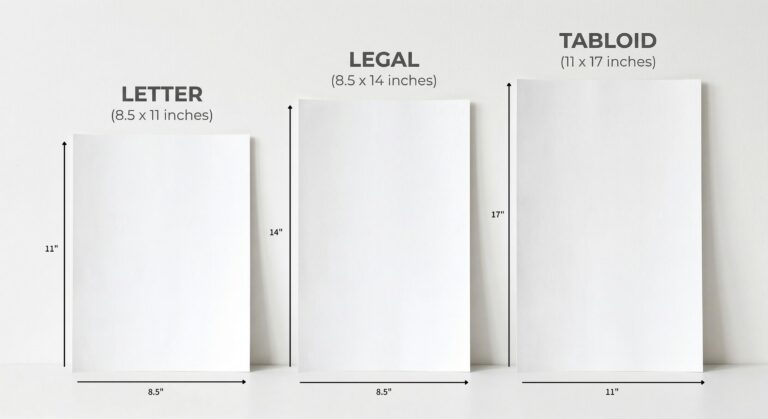
Letter vs Legal vs Tabloid: Key Differences at a Glance
- Letter: Standard size for daily documents, easiest to print and share
- Legal: Same width as Letter but longer, ideal for contracts and detailed content
- Tabloid: Larger format, best for visuals, layouts, and multi-column designs
Paper Size Dimensions and Common Uses
- Letter: 8.5 x 11 inches (215.9 x 279.4 mm)
- Legal: 8.5 x 14 inches (215.9 x 355.6 mm)
- Tabloid: 11 x 17 inches (279.4 x 431.8 mm)
- Letter: Reports, memos, invoices, handouts
- Legal: Contracts, agreements, real estate documents
- Tabloid: Posters, custom newsletters, menus, design proofs
Letter Size (8.5 x 11 inches)
- Best for: Everyday business documents, schoolwork, internal communications
- Why use it:
- Standard across offices, printers, and software
- Easy to read and distribute
- Fits standard folders and binders
- Limitations:
- Limited space for long or complex documents
- Printing notes:
- Compatible with virtually all printers
- Safest choice when documents will be printed by others
Letter is the default for a reason. It is the fastest and most reliable option for most workflows.
Legal Size (8.5 x 14 inches)
- Best for: Contracts, agreements, detailed forms, financial documents
- Why use it:
- Extra length reduces page breaks
- Keeps clauses and sections together
- Allows space for signatures and notary blocks
- Limitations:
- Not all printers support Legal by default
- Can create formatting issues if printed on Letter
- Printing notes:
- Requires proper printer tray or manual feed
- Always set document size to 8.5 x 14 inches before exporting
Legal is ideal when document continuity matters and you need more vertical space without splitting content across pages.
Tabloid Size (11 x 17 inches)
- Best for: Posters, printed brochures, newsletters, charts, large-format visuals
- Why use it:
- More space for images, charts, and multi-column layouts
- Strong visual impact for presentations and marketing
- Can be folded into booklet spreads
- Limitations:
- Not supported by most standard office printers
- Higher printing and mailing costs
- Printing notes:
- Often requires production printers or professional print services
- Use high-resolution images (300 dpi) for best results
Tabloid is built for visibility and design flexibility, not long-form text.
How to Choose the Right Paper Size
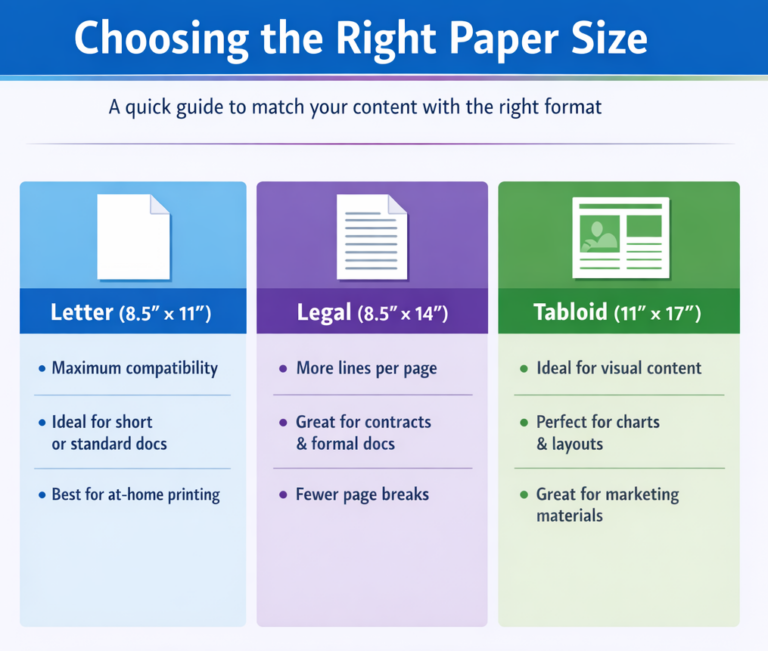
- Choose Letter if:
- You need maximum compatibility
- Your document is short or standardized
- Your audience will print it themselves
- Choose Legal if:
- You need more lines per page
- You are working with contracts or formal documents
- You want to reduce page breaks
- Choose Tabloid if:
- Your content is visual or design-heavy
- You need space for charts, layouts, or large text
- You are creating marketing or presentation materials
Start with how the document will be used, not just how it looks.
Formatting and Printing Tips
- Set your page size before designing to avoid layout issues
- Use at least 0.5 inch margins for Letter and Legal documents
- Mirror margins for double-sided printing
- Export files as PDFs with the correct page size embedded
- Include bleed and crop marks for edge-to-edge Tabloid designs
- Set up print to edge for full coverage
- Test print one copy before running a full job
- Pick the right paper weight (80 lb vs 100 lb paper) that complements your document
Planning ahead prevents scaling issues, wasted prints, and formatting errors.
Final Takeaway
Letter, Legal, and Tabloid each serve a specific purpose. Letter is the most practical and widely used. Legal provides extra space for formal documents. Tabloid delivers the room needed for visual impact.
Choosing the right size early keeps your content clear, your layouts intact, and your print process efficient.
Ready to print with confidence?
Mimeo makes it easy to produce, format, and deliver documents in any size, from everyday handouts to large-format materials. Explore our print solutions to get started.

Shari Cooke
Director of Customer Service
Shari Cooke is Director of Customer Service for Mimeo Business US, with more than 12 years at Mimeo and a background in graphic design that gives her a unique eye for both the creative and operational sides of print. Based in Memphis, she leads the team that keeps customer orders running smoothly from file to delivery. Her posts help businesses avoid common print pitfalls and get professional results, drawing on years of solving real customer challenges firsthand.

 Mimeo Print
 Mimeo Digital for Participants
 Mimeo Marketplace
 PrintX
 Mimeo Photos